How Automatic Self-Cleaning
Filters Work
The screen does the filtering. The cleaning cycle is what makes it automatic — and what decides whether the line ever has to stop.
The screen loads, and the filter notices
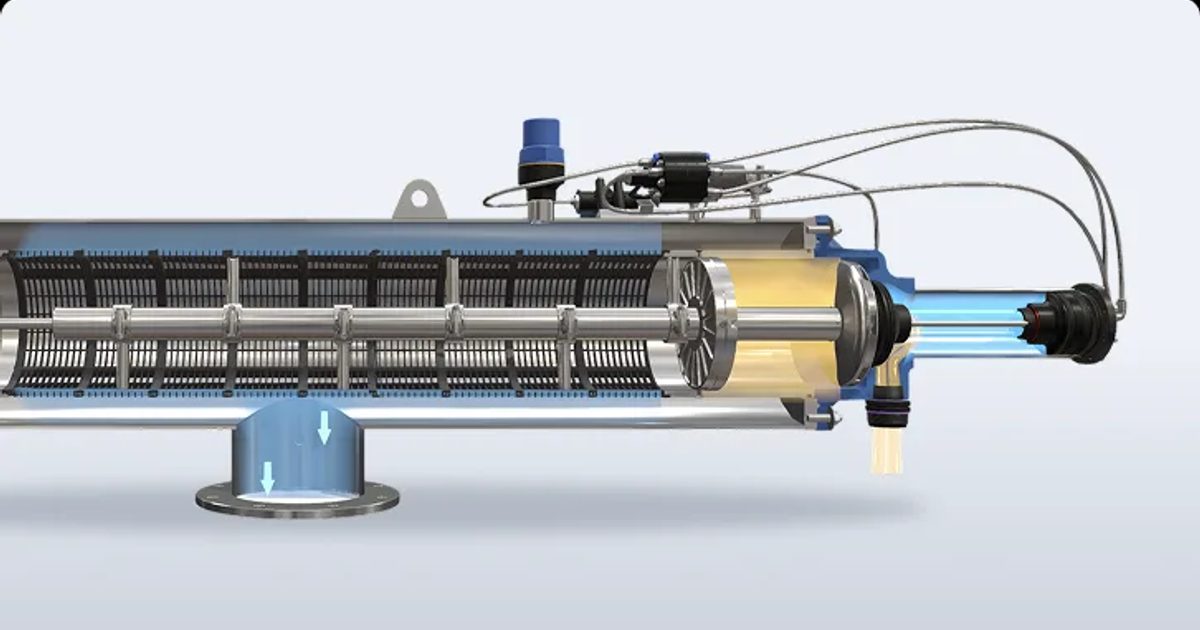
Water enters the filter body and passes from the inside of a cylindrical screen element to the outside. Solids larger than the screen aperture stay on the inner face and build up as a layer.
That layer is what the filter measures. As it thickens, the pressure difference between the inlet and the outlet rises. A clean screen typically sits under 0.2 bar; when the difference reaches roughly 0.5 bar the controller starts a cleaning cycle. Nothing is timed, guessed or scheduled — the filter responds to the water it is actually receiving.
That distinction matters on real sites. Water quality is not constant: a storm event, a bore drawing sand, or a cooling tower after a chemical dose all load a screen faster than the week before. A filter that cleans on differential pressure follows those swings by itself. A filter cleaned on a maintenance roster does not.
The cleaning cycle, step by step
Five to seven seconds on DN50–DN100 models, fifteen to seventeen on the larger bodies and the electric range.
- 1
Differential pressure builds
Solids accumulate on the inner face of the screen and the pressure difference across it rises.
- 2
The controller triggers
At the set differential — or on a backup timer, whichever comes first — the cleaning cycle starts.
- 3
The flush valve opens
Opening the drain line drops the pressure inside the scanner assembly, which is what creates the suction.
- 4
The scanner sweeps the screen
Nozzles traverse the full screen surface in a spiral, lifting the accumulated layer off the mesh rather than trying to blow it back through.
- 5
Solids leave through the drain
The lifted solids exit through the DN50 flush outlet. Filtered flow to the process continues throughout.
- 6
The valve closes
Differential pressure returns to clean-screen values and the filter goes back to monitoring.
Suction scanning, not reverse flushing
The term "backwash" covers two quite different mechanisms, and the difference decides how much water a cleaning cycle costs you.
A reverse-flush filter pushes clean water backwards through the whole screen area to dislodge the cake. It works, but it treats the entire screen even though only part of it is loaded, and the process line usually has to be interrupted or bypassed while it happens.
A suction scanner cleans a small patch at a time. Nozzles pass over the screen surface and draw the solids off it, so only the water passing through those nozzles goes to drain. The rest of the screen keeps filtering while the scan is running. That is why a cleaning cycle is measured in seconds rather than minutes, and why the downstream process never sees an interruption.

What starts a cleaning cycle
Most installations run the first two together — differential pressure does the work, the timer is the safety net.
| Trigger | What it responds to | When it earns its place |
|---|---|---|
| Differential pressure | The actual solids load on the screen, measured across it | The primary trigger on every installation. Follows water quality as it changes instead of assuming it. |
| Timer | Elapsed time since the last cycle | A backstop. Clears a light but sticky load — biofilm, algae — that fouls the screen without ever building enough differential to trigger on its own. |
| Manual / remote | An operator or the site control system | Commissioning, maintenance checks, or a deliberate flush before a shutdown. |
Two screens, two jobs
Every filter in the range carries a coarse screen and a fine screen, and they are not doing the same work.
The coarse screen is a 7000 µm plate — 7 mm openings. It is there to stop the debris that would damage or jam the scanner assembly: stones, weed, bark, the things that get into an open channel or a dam intake. It contributes almost nothing to pressure drop, and it is not what determines your filtration grade.
The fine screen is the one that sets the specification. It is available from 30 µm up to 800 µm, and choosing it is a trade-off rather than a maximum: a finer screen captures more, but loads faster and therefore cleans more often.
How much more often is not a property of the filter — it is a property of the water. The same model can run for days between cycles on clean bore water and cycle several times an hour on a dam intake after rain. That is precisely what the sizing calculation is for, and why the configurator asks for solids loading instead of assuming a figure.
The micron and mesh conversion guide sets out how the grades compare, and what each one actually removes.

What moves the scanner
The cleaning principle above is identical across the range. What differs is the power behind it.
On the hydraulic FW Series the line's own pressure drives the scanner, through a diaphragm actuator on DN50–DN100 and a piston on the larger bodies. No motor, no wiring, no external supply — which is why this is the straightforward choice on a remote or unpowered site. It needs 2 to 10 bar to work with.
On the electric FED Series a motor drives the scanner instead, so the filter keeps cleaning where there is too little line pressure to actuate a hydraulic drive — from 0.5 bar. It needs a power supply and a controller, and in exchange the cleaning cycle is independent of what the line is doing.
The drive type does not change the filtration grade, the screen, or the fact that flow continues during cleaning. It changes where the filter can be installed.

What a cleaning cycle actually costs
The figures below are typical for the range. Exact values depend on model, screen grade and line pressure — the configurator returns them per model.
| Typical | |
|---|---|
| Cycle duration, DN50 – DN100 | 5 – 7 seconds |
| Cycle duration, DN100 – DN450 | 15 – 17 seconds |
| Process interruption | None — filtered flow continues throughout |
| Flush drain connection | DN50 |
| Clean-screen differential | Under 0.2 bar |
| Typical trigger differential | Around 0.5 bar |
Size a filter for your duty
The configurator works from your flow rate, water quality, line pressure and target micron, and returns the model, screen grade and expected cleaning frequency.